
navlogo_blue

Dutch

German

Backup Your Google
Workspace Data

Secure, EU-hosted backups you fully control.

Mindtime GWS backup works with:

Best price & value

Recover in minutes

100% GDPR compliant
When using Google Workspace
is your data really safe?

Increased Cyberattacks

Native retention isn’t designed for modern attacks.

Data loss & human error

Deleted data isn’t always recoverable.

Compliance Challenges

Data residency and GDPR risks are real.

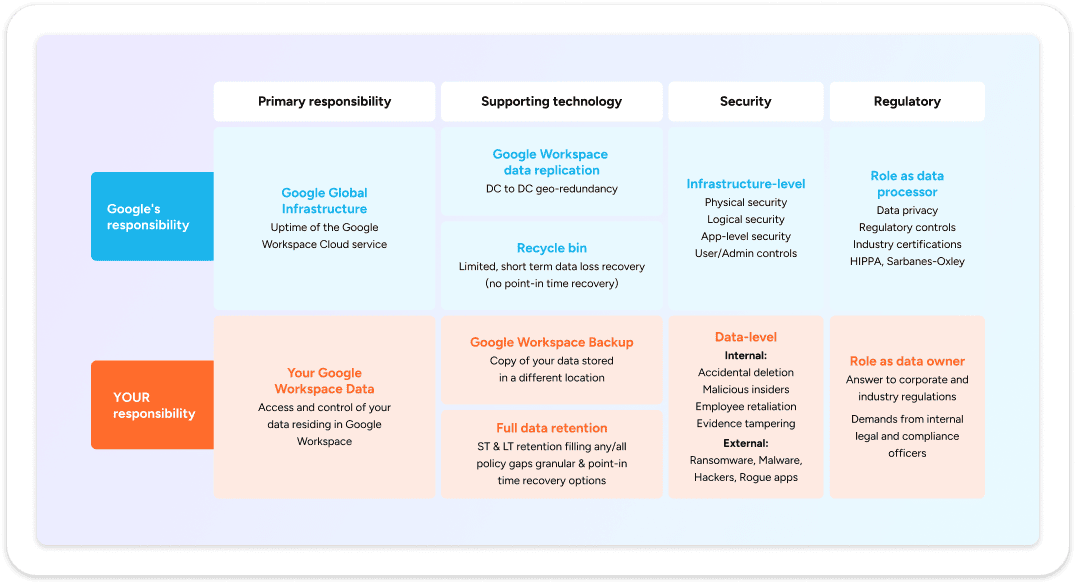
Your Google Workspace Data = Your Responsibility

Google secures the platform. You must secure the data.

Google Workspace follows a shared responsibility model. While Google secures the platform and infrastructure, your data remains your responsibility. This means protecting it against accidental deletions, ransomware, and compliance gaps is up to you. Relying only on native retention features leaves critical risks uncovered—especially in regulated environments.

Backups Since 1998, We've Got You Covered

Safeguarding data long before the "Cloud" was invented.

Backups before "Cloud" was invented

Founded in 1998, Mindtime has decades of experience protecting business-critical data across every IT era.

Protection that goes further

Native Google tools fall short against ransomware, accidental deletions, and GDPR demands.

Dutch, sovereign and certified

ISO 27001 certified, EU-hosted infrastructure in the Netherlands and Germany, and over 25 years of expertise.

Mindtime backup for Google Workspace
Plan & Pricing

One simple plan
Flat per user price

Long Term 
Price Lock

All Inclusive 
No add-ons

Features

Unlimited Storage: all inclusive

Backup for Google Workspace

Granular and flexible recovery

Backup locations Netherlands and Germany

Fully owned backup infrastructure: no hyperscalers

Full GDPR compliant

Fast backups – No throttling

Local support in Dutch, German and English

Scalable & Cost-Effective: no hidden fees

Best Value
Mindtime Logo

Mindtime Google Workspace

3.50

Per user/month billed annually

1 year
Everything you need to secure your Google Workspace
✓
✓
✓
✓
✓
✓
✓
✓
✓
Mindtime Logo

Others

€€€

Unclear Pricing

Hidden Charges

Weak and incomplete security
✓
✓
✓
✓
✓
✓
✓
✓
✓

Save time, reduce cost with
Mindtime Google Workspace backup

Effortless backup

Seamlessly back up your files to the mindtime cloud. 

Recover in minutes, not days

15-minute RPO + granular restores mean you’re back online fast

Full control of your data

You own clean, portable backups forever

Frequently asked questions

Does Google Workspace already back up my data? +

Not in the way most organizations mean “backup.” Google Workspace is designed for high availability and continuity of the service and it includes helpful native capabilities (like recycle bins, version history and retention features). However, those features are not the same as an independent, comprehensive backup that lets you restore data on demand across scenarios such as accidental deletion, malicious activity, misconfiguration or tenant-level incidents.
In practice, Google Workspace follows a shared responsibility approach: Google secures and operates the cloud service, while your organization remains responsible for protecting its own data and ensuring it can be recovered when needed.

How can I back up my Google Workspace data? +

For reliable Google Workspace backup, organizations typically choose a dedicated third-party backup that is built specifically for backup and recovery. With Mindtime Google Workspace Backup, the goal is straightforward: create an independent copy of your critical Google Workspace data and make recovery fast and predictable, whether you need to restore a single email, a folder or larger sets of data.
A good Google Workspace backup approach should also support clear scheduling (to meet your RPO/RTO needs), granular restores and strong search to help with operational recovery as well as compliance and eDiscovery-related requests.

What is the standard retention policy in Google Workspace? +

We provide a 30-day retention policy for Google Workspace backups. Retention determines how long we keep the previous version of a modified file or a deleted item — including files, contacts, calendar entries, and more.
When a new version of an item is backed up, we retain the previous version until the end of the 30-day retention period. After that, it's permanently removed from the backup.

Why use Mindtime instead of relying on Google's first-party options (such as Google Workspace Backup Storage)? +

Google’s native and first-party options can be useful in specific situations, but many organizations still choose a dedicated backup for one core reason: independence.

  • A separate backup copy (so recovery doesn’t depend on the same environment where the incident occurs)
  • Control over restore and retention aligned with your organization’s operational and compliance needs
  • A clear fit for organizations operating in the EU market (Netherlands, Belgium, Luxembourg, Germany) where data governance, accountability, and audit readiness matter day-to-day

What counts as a “user” in Google Workspace backup? +

A user usually represents one unique Google Workspace account that you want to protect. Even if that person subscribes to multiple services (such as Gmail, Google Drive, Contacts, Calendar), this generally counts as one user from a backup perspective.
The exact count may vary depending on the domain structure and the use of shared accounts or service accounts.

How many Google Workspace users should I back up? +

In most organizations, the safest answer is: all users that generate or handle business-critical data. Every mailbox, Google Drive and collaboration space can contain information that matters for continuity, legal obligations, customer commitments or simply day-to-day operations. Leaving gaps creates risk, because the one account you didn’t protect can become the one you urgently need during a recovery or compliance request.

× Enlarged view
Scroll to Top